ICICI Bank Integration
The ERP built around ICICI Corporate Banking - not bolted onto it
Real-time payments and reconciliation built on ICICI Bank. Secure, automated, and integrated directly within your ERP.

Built on ICICI's own CMS rails
Connects directly to ICICI Bank's Corporate API — supporting RTGS, NEFT, CMS, and Bank Transfers natively. No middleware. No generic bank connector repurposed for ICICI.
3-factor authorization on every payment
User ID, token, OTP — mandatory on every payment. This is ICICI Bank's own authorization requirement, built into the workflow — not a setting you configure.
Bank-registered and verified
User ID, token, OTP — mandatory on every payment. This is ICICI Bank's own authorization requirement, built into the workflow — not a setting you configure.
What actually changes
Your ICICI Bank workflow Before and After
Not what connected banking does in theory. What specifically changes about your daily finance operations.
Legacy Workflow
Download ICICI statement manually at month end.
Enter transactions line by line into your accounting system.
Log into ICICI net banking separately to initiate vendor payments.
Check balance by opening ICICI portal or InstaBIZ separately.
Find out about debits and credits at next statement download.
Reconcile manually — usually days after transactions occur.
Month-end closing takes days because data is always behind.
With Alignbooks + ICICI Bank
Statement fetched automatically inside AlignBooks — whenever you need it.
Post bulk transactions directly from the fetched statement ledger-wise, one action.
Payment window opens inside AlignBooks while entering the bill approve and sent.
Balance visible inside AlignBooks before every payment — no switching.
Every debit, credit, and payment status visible in real time inside AlignBooks.
Books and bank stay in sync automatically — exceptions flagged clearly for review.
Closing is faster — books have been current all month.
What you unlock
Six things that work differently with AlignBooks + ICICI Bank
Not connected banking in general. Specifically what changes when AlignBooks is connected to your ICICI corporate account.
Your ICICI statement comes to you — you don't go looking for it
AlignBooks fetches your ICICI Bank statement directly, inside the ERP. Your accountant works from a live feed — not a downloaded file. Reconciliation starts immediately. Ledger-wise posting on the same screen.
- No manual statement download or upload
- Ledger-wise posting from fetched statement
- Reconciliation errors from re-entry go to zero
Vendor payments go out from AlignBooks — not from net banking
While entering a bill payment, a payment window opens automatically. Approve it. Your vendor is paid through ICICI Bank. Books update. In one action, without switching screens
- No separate ICICI net banking login
- CMS payments run directly from AlignBooks
- Payment and voucher posting in one action
Post multiple transactions in one action — not one by one
Select the ledger account. Post all debit and credit transactions from the fetched ICICI Bank statement at once. What takes an hour takes a few clicks.
- Bulk posting replaces line-by-line entry
- Finance team time goes toward analysis, not data entry.
- No re-entry means no re-entry errors
Know the moment money moves — inside your ERP
Every debit, every credit, every payment status update from ICICI Bank appears inside AlignBooks as it happens. No waiting for a statement. Payment confirmations, processing updates, receipt notifications — in real time
- Cash flow visibility shifts from monthly to real-time.
- No portal switching to check payment status
- Discrepancies surface immediately
Check your ICICI balance before you pay — without leaving AlignBooks
Your available ICICI Bank balance is visible inside AlignBooks before you initiate any payment. One screen. No switching. No second tab kept open all day.
- Better fund planning before bulk payments
- Prevents payment failures from insufficient balance.
- One less reason to keep a banking portal open.
Every payment protected by ICICI Bank's own 3-factor auth — automatically
This isn't a security feature AlignBooks added. It's ICICI Bank's mandatory authorization requirement built into every payment flow. No payment leaves without passing all three:
- User ID authentication — confirms who is initiating the payment.
- Token verification — validates the secure token from your ICICI portal.
- OTP authentication — final confirmation before payment is processed
How it works
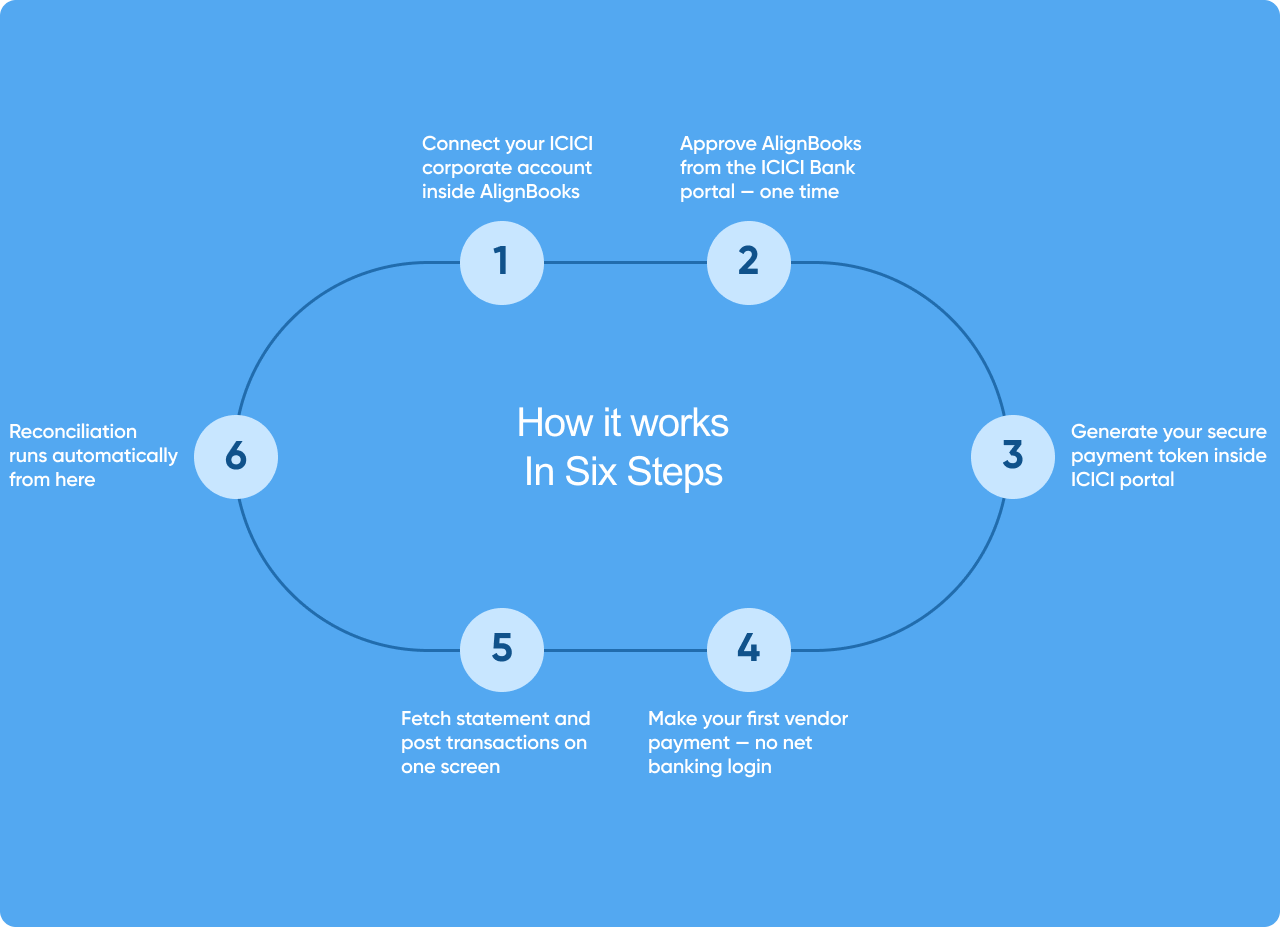
From connection to first live payment Six Steps
Our team walks you through every step. Most businesses complete setup and process their first payment within a few days
Who this is for
Built for ICICI Bank customers managing real transaction volumes
AlignBooks makes the most difference when your business runs multiple vendor payments daily, collects from many customers, or manages accounts across branches.

Already live on ICICI Bank
What businesses say after connecting
AlignBooks is already processing payments and reconciliations through ICICI Bank Corporate Banking
If you want to speak to a business in your industry that's already connected — we'll set that up before your demo.
Ready to connect your ICICI
Bank account to AlignBooks?
Request a demo — we'll show you the integration live on a real AlignBooks account connected to ICICI Bank. Not a slide deck.
30-min call
Scheduled at your convenience — no commitment
Live walkthrough
On a real AlignBooks account connected to ICICI Bank.
We handle setup
Our team manages the ICICI Bank connection process with you
Go live in days
First live payment processed within days of your decision
The ICICI Bank connection setup — end to end
Connecting to ICICI Bank's Corporate API requires a registration and approval process with the bank. It sounds more complex than it is. Our onboarding team has done this dozens of times — we know exactly what ICICI needs, in what order, and we handle it alongside you so nothing gets delayed or missed.
1. We assess your ICICI Bank account type
Confirm you're on ICICI Corporate Banking and identify the right CMS setup for your business
2. We guide the ICICI portal approval
Confirm you're on ICICI Corporate Banking and identify the right CMS setup for your business
3. We help generate your payment token
Set up your secure payment token inside ICICI portal — the key that authorizes payment processing
4. We stay through your first live transaction
Our team is available until your first real payment goes through and reconciliation is confirmed